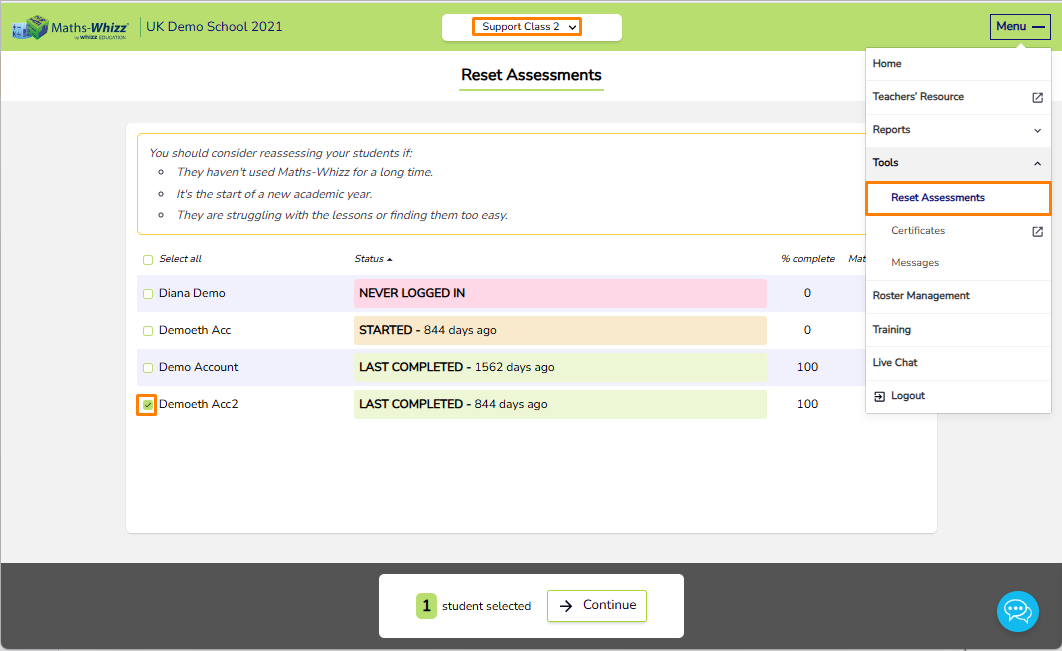
The Reset Assessments option, found under the Tools dropdown in the menu, allows you to reset a student’s assessment. This starts a new assessment that recalculates their Maths Age from scratch based on their performance and restarts their learning path from the new assessment results.
You should consider reassessing your students if:
- They haven't used Maths-Whizz for a long time.
- It's the start of a new academic year.
- They are struggling with the lessons or finding them too easy.
To reset assessments:
- Select a class from the top banner.
- Select Menu > Tools > Reset Assessments.
- Select the student(s) whose assessment you want to reset, then follow the on-screen prompts to complete the reset.